 SmartSoloFlow

Key Takeaway: Pick the habit app you will actually open, then let a Make.com scenario log your check-ins so one busy day doesn't break your data.
System Goal: Reliable habit data with less manual logging
Core Framework: A check-in app plus Make.com logging to Notion or Google Sheets
The best app for tracking habits is the one you still open on your busiest day. For solopreneurs, that is usually where tracking breaks down: you forget to check in, the streak snaps, and you stop trusting your own data.
Below are six apps for habit tracking, from Streaks to a DIY Notion tracker, plus a Make.com setup that logs check-ins for you. Every pick is judged on one question: how easy is it to log a check-in without thinking? You'll also see which plan limits and platform limits matter before you commit.
Some apps can already auto-track habits through health data, so this guide shows where that works and where it doesn't. Once you pick one, schedule the habit into a time block so it has a fixed spot in your day.
- What to Look for in an App for Tracking Habits
- 1. Streaks: A Strong iPhone Pick With Built-In Health Sync
- 2. Habitify: Clean Tracking, but Automation Sits on the Top Plan
- 3. Habitica: Free, Game-Like Tracking With a Real Make.com Connection
- 4. Way of Life: Fast Color-Coded Entries and Easy Exports
- 5. Loop: A Free Habit Tracker App for Android That Keeps Data on Your Phone
- 6. A Notion Habit Tracker: Build It Yourself
- How These Habit Apps Compare at a Glance
- How to Automatically Log Habit Check-Ins to a Spreadsheet
- Built-In Sync vs. a Make.com Scenario
- The Scenario in Four Steps
- Picking the Best Habit Tracker App for Your Setup
- Pick One App and Let the Spreadsheet Remember
What to Look for in an App for Tracking Habits
A good app for tracking habits lets you log a check-in in a few seconds, runs on the device you carry all day, and shows streaks you can trust. For a solopreneur, add one more test: can the check-in happen without you opening the app? That last test is where many apps fall short.
Run any habit tracker app through this checklist:
- Speed: one or two taps to log a check-in.
- Platform: works on the phone or computer you actually use.
- Free-tier limits: how many habits and reminders you get before you pay.
- Your data: streaks and completion rates, plus an export or an API if you want the raw numbers.
- Hands-off logging: health data, shortcuts, or an automation tool can record or copy the check-in for you.
The last item matters more than it sounds. TimeCamp's habit tracker roundup, last updated in April 2026, marks eight of its ten apps as having no automatic tracking. In a busy week, that gap is how a streak quietly breaks.
This is where Make.com earns a place in the conversation. Make.com is a visual automation platform that connects apps, and it can write each check-in into a Notion database or a Google Sheets row for you. We'll build that scenario after the app picks.
1. Streaks: A Strong iPhone Pick With Built-In Health Sync
Streaks is a habit tracker for iPhone and Apple Watch that can mark some habits complete on its own. It does that for tasks linked to the Health app, such as step and distance goals. For habits Health data can't measure, you still tap the check-in yourself.
The app lets you track up to 24 tasks a day and sends reminders when a task is due. It also has a Today widget and Apple Watch complications for quick check-ins, and you can share tasks with other Streaks users for accountability. Streaks reads Health data only with your permission.
- Best for: solopreneurs on iPhone who want a fast check-in and have habits, like a daily walk, that Health already measures.
- Watch out for: work habits such as writing or outreach. Those aren't Health data, so Streaks won't tick them off for you. If you're on Android, the next picks fit better.
For the Make.com scenario later in this guide, we use apps and databases with a confirmed connection route, so Streaks stays a standalone pick here. Check the App Store for current pricing before you buy.
Details checked: October 2026
2. Habitify: Clean Tracking, but Automation Sits on the Top Plan
Habitify is a cross-platform habit tracker with Free, Plus, and Pro plans. Its automation and API access sit on Pro, the top paid tier, according to Habitify's own plan comparison. If you only want simple check-ins, a lower tier may be all you need.
Habitify moved to the Free, Plus, and Pro structure in April 2026, and Pro is the old Premium plan. Its help center lists automation, Zapier, IFTTT, API, and MCP access under Pro. Make.com isn't named there. You would reach Habitify through its API with a Make.com HTTP module, which takes more setup than picking a ready-made app.
- Best for: solopreneurs who want a polished tracker and are fine paying for Pro if they need automation.
- Watch out for: the free plan's habit limit and the Pro-only automation. Check Habitify's current plan page for both, since the plans changed this year.
The API route also asks you to handle an API key and request settings yourself. That is a fair trade for a developer, but a lot to ask on a busy Tuesday if you've never opened an API doc.
Details checked: October 2026
3. Habitica: Free, Game-Like Tracking With a Real Make.com Connection
Habitica is a free habit app that turns your tasks into a retro role-playing game. You check off real-life tasks and earn gold, experience, and items. It runs on iOS, Android, and the web, and it is open source.
The app can be used fully for free, with optional in-app purchases and subscriptions. It also has something the other apps so far don't: a listed Make.com app. Make.com's own Habitica page describes an instant trigger that watches for task activity, and Make sets up the webhook in Habitica for you when you add it.
- Best for: solopreneurs who stay motivated by game mechanics and want a free tracker that Make.com can read.
- Watch out for: the game layer. If you want a plain, quiet tracker, the avatars and rewards can feel like a distraction.
Connecting takes your Habitica User ID and API token, pasted into Make.com. It is a short step, but a fiddly one if you've never handled an API token. That connection makes Habitica a strong candidate for the scenario later in this guide.
Details checked: October 2026
4. Way of Life: Fast Color-Coded Entries and Easy Exports
Way of Life is a habit tracker for iPhone and Android built around quick check-ins. Its color-coded system lets you log your habits in a few seconds a day, and charts with trend lines show how you're doing. The iPhone listing also mentions CSV and Excel export.
That listing adds tags, a weekly and monthly scoreboard, notes, and support for Siri and Shortcuts. Backup and restore became free for all users in version 4.3.0. The export is useful if you like analyzing your own data in a spreadsheet, but it is a manual step, not a live sync.
- Best for: solopreneurs who like seeing trends and want their habit data in a spreadsheet.
- Watch out for: the free version's limits. Read the App Store listing for what it includes before you rely on it.
If you want a spreadsheet log without exporting by hand, you need a different route. That is what the Make.com section below covers.
Details checked: October 2026
5. Loop: A Free Habit Tracker App for Android That Keeps Data on Your Phone
Loop Habit Tracker is a free, open-source habit tracker app for Android. According to its project page, it has no ads, no limit on how many habits you can add, and every feature is open to every user.
Loop doesn't need an internet connection or an online account. It scores each habit's strength, and Loop says a few missed days after a long streak won't wipe out your progress. You can set a reminder for each habit and check it off from the notification. Export to CSV or SQLite is built in.
- Best for: Android users who want a free tracker, strong privacy, and a CSV export they can open in a spreadsheet.
- Watch out for: the platform and the offline design. It is Android only, and because your data stays on the phone, there is no built-in way to send check-ins to Make.com.
That trade is fine if privacy matters more than automation. If it doesn't, pick an app that can talk to other tools.
Details checked: October 2026
6. A Notion Habit Tracker: Build It Yourself
A Notion habit tracker is a database with a date and one checkbox per habit. You can build it yourself or start from a template, and it sits right next to your tasks and client notes. I've used Notion. A habit database in it needs only those two property types to work.
Notion's own template gallery includes a free Habit Tracker template. It uses a table with days of the week as rows and habits as columns, and each cell is a checkbox. You can add more habits by adding more checkbox properties to the database.
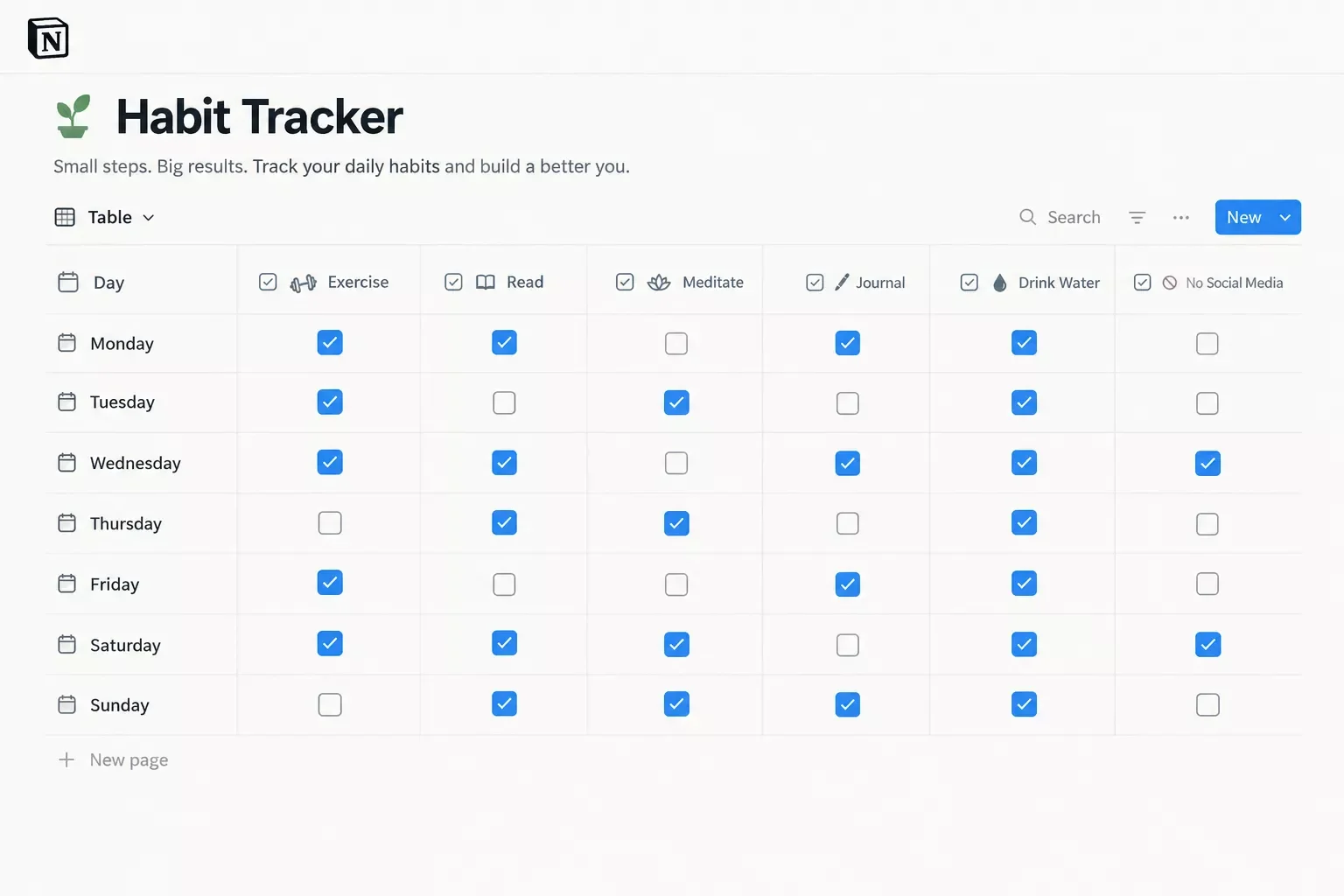
One checkbox per habit, per day.
- Best for: solopreneurs who already work in Notion every day and want habits beside tasks and client notes.
- Watch out for: the open-it-first problem. A tracker you build yourself only works on days you open it.
Notion is also the easiest of the six to feed automatically. Make.com has a Notion app that can create and update database items, so each check-in can land as a new row. Connecting it needs admin permissions in your Notion workspace.
Details checked: October 2026
How These Habit Apps Compare at a Glance
Here is how the six picks compare on what matters for hands-off logging: platform, built-in auto-logging, and the Make.com route we could confirm. Where we couldn't confirm a route, the table says so instead of guessing. If automation is your goal, read the last column first.
Plans and features above were verified at the time of writing. Since they change often, please confirm current details on each provider's official website before making a decision.
How to Automatically Log Habit Check-Ins to a Spreadsheet
You can automatically log habit check-ins to a spreadsheet with a Make.com scenario that watches your habit app and adds a row to Google Sheets each time you check in. Of the six apps here, Habitica has the most direct route: a Make.com app with an instant trigger.
Built-In Sync vs. a Make.com Scenario
Use built-in sync first when your app offers it. Streaks, for example, can mark Health-linked tasks complete on its own. Reach for Make.com when your habit isn't Health data, such as writing or outreach, or when you want every check-in saved as a spreadsheet row.
How a Habitica check-in becomes a Google Sheets row through Make.com.
The Scenario in Four Steps
- Copy your User ID and API token from your Habitica settings.
- In Make.com, add Habitica's Watch Task Activity module, create the connection with those two values, and choose the Scored option.
- Add Google Sheets, then Add a Row. Connect your Google account and map the fields Make.com returns, such as the task title, to your columns.
- Click Run once, check a habit in Habitica, and confirm a row appears before you switch the scenario on.
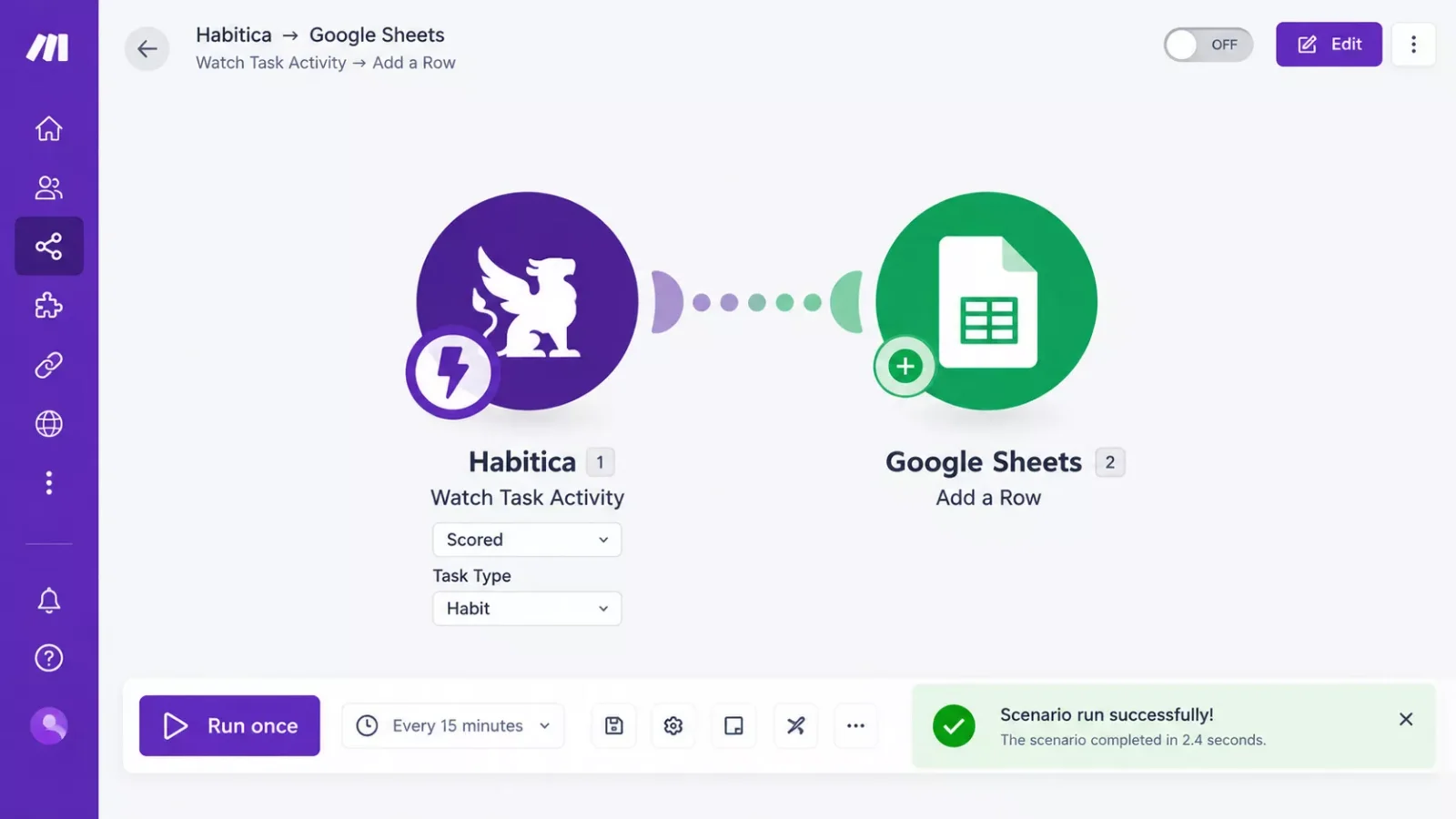
The scenario in Make.com's editor.
Prefer Notion? Swap the second module for the Notion module that creates a database item. It needs admin permissions in your workspace.
Make.com's own Habitica page says its documentation for this app is limited, so step four matters. This scenario uses an instant trigger, so it fires when you check in instead of polling. Each run uses Make.com credits, while a scheduled Watch module uses credits on every check, even when nothing new happened.
- Want a smaller first scenario? Try a Make.com task batching build.
- If a Sheets scenario stops adding rows later, see these fixes for spreadsheet automation that breaks.
We found no paid-plan requirement on the Habitica side, but check Make.com's current pricing for your credit allowance. If you prefer Habitify, the route is its API through Make.com's HTTP module on a schedule, and that API sits on Pro.
Details checked: October 2026
Picking the Best Habit Tracker App for Your Setup
Pick the best habit tracker app by your phone and your goal: Streaks on iPhone for Health-linked habits, Loop on Android for a free and private tracker, and Habitica if you want Make.com to log check-ins for you. Here is the quick decision rule.
- On iPhone, and your habits are things Health measures: choose Streaks.
- You want every check-in in a spreadsheet automatically: start with Habitica and the scenario above.
- You already live in Notion: build the tracker there and keep everything in one workspace.
- On Android and privacy matters most: choose Loop.
- You like trends and exports: choose Way of Life.
- You want a polished app and will pay for Pro: check Habitify's current plans first.
No app on this list fits every solopreneur. If you can't decide, take the one that matches your phone today and switch later. Your habit log in a spreadsheet moves with you. Whichever app you pick, give it one full week before you judge it.
People Also Ask
Which app for tracking habits is best for a solopreneur?
The best one is the app you'll open every day. Streaks suits iPhone users with Health-linked habits, Loop suits Android users who want a free, private tracker, and Habitica suits anyone who wants Make.com to log check-ins automatically.
What is the best app to track bad habits I want to break?
Habitica has a minus button for bad habits, and Way of Life describes itself as built for both building good habits and breaking bad ones. Pick whichever check-in you can tap fastest on a stressful day.
What is the best app to track habits with friends?
Streaks lets you share tasks with other Streaks users for accountability. Habitica also has groups. If you track habits alone, you can skip both features and still get the full value of the app.
What is the best way to track habits when I keep forgetting to open the app?
Let something else do part of the work. Streaks can complete Health-linked tasks on its own, and both Streaks and Loop support reminders. For other habits, a Make.com scenario can copy each Habitica check-in into a Google Sheets row, so your record stays in one place.
How much time should a solopreneur spend tracking habits each day?
Aim for under a minute. Way of Life's own App Store listing says to invest less than a minute daily. If tracking takes longer, you likely have too many habits or an app that asks too much of you.
Should I track every habit or only a few?
Start with one to three habits that move your business forward. Add more only after those feel automatic, because a long list is the fastest way to stop checking in at all.
What should I do when I miss a day?
Log it honestly and carry on. Loop says a few missed days after a long streak won't wipe out your progress, and a spreadsheet log shows a pattern more clearly than a broken streak does. If missed days pile up, an auto-reminder system can nudge you before the streak slips.
Do I need a paid Make.com plan to log habit check-ins automatically?
Make.com says new users get a free account, and each scenario run uses credits. Check Make.com's pricing page for what your plan includes before you build, since credit allowances can change.
Pick One App and Let the Spreadsheet Remember
A habit only counts when you can see it. Choose one app from this list, check in for a week, fold the habit into your daily routine, and give it a fixed spot in your day. That fixed spot is what keeps a busy Tuesday from erasing your streak, and time blocking apps can help you protect it.
If the app itself keeps getting skipped, stop blaming yourself and change the system. A Make.com scenario that writes each check-in to a spreadsheet takes the remembering off your plate.
⚡ Pro Tip: Run one habit and one check-in method for a week or two before you add any automation. You'll know the habit is worth logging, and the scenario will be simpler to build.
If you've read this far, you probably have a habit you keep meaning to track and a client list that keeps winning the day. Here's a free move: put the check-in time on your calendar and pin the spreadsheet to your phone's home screen, so logging is one tap.
And if you'd rather get that time back than spend a weekend wiring up the scenario, this is exactly the kind of system I set up so solopreneurs don't have to.
Want This Built for Your Business?
SmartSoloFlow builds Make.com workflows for solopreneurs. Tell us the habit or process you want logged, and we'll map out the setup with you.
Let's TalkFound this guide useful? Share it with a fellow freelancer who's still doing things manually. 🚀
Got a question or a workflow roadblock? Drop it in the comments below, happy to help.
Last Updated: October 13, 2026

// Comments