 SmartSoloFlow

Key Takeaway: Check Zoho's sync history first, give one system ownership of stock updates, and add error handling around the sync so failures get caught instead of missed.
Primary Tool(s): Zoho Inventory, Shopify, Make.com
If your Zoho Inventory Shopify sync keeps breaking, you're not imagining it. Small business owners who connect no-code solutions like Zoho Inventory to Shopify, Zoho Books, or other tools often hit sync failures they can't afford to keep fixing manually. This guide covers the problems users report and what you can do about each one.
You don't need a developer to improve this. Make.com's visual builder lets you add your own checks and alerts on top of the tools you already use, though your Zoho plan's limits still apply.
Common Zoho Inventory Shopify Sync Problems Users Report
Two Zoho Inventory Shopify sync problems are described in Zoho's own community forum: stock counts that change by themselves, and Shopify orders that never become Zoho sales orders. Both are user reports, and Zoho has not confirmed either one as a bug.
- Stock counts change on their own after switching to Locations. One user said that after migrating to Zoho's Locations feature, item quantities began shifting at irregular intervals, and they had to turn the Shopify integration off twice to fix counts by hand (forum thread).
- Shopify orders do not show up as Zoho sales orders. Several users describe automatic sync no longer fetching orders, with a manual sync pulling in items but no sales orders (one example).
Before you change anything, open the sync history page in Zoho's Shopify settings. According to Zoho's help documentation, it logs which items and sales orders synced or failed on each run, and you can re-initiate a sync for a specific timestamp or pull items and orders from a custom date range. That tells you whether the problem is a failed run or a setting.
Common Mistakes That Break Your Zoho Inventory Integrations
Sync failures between Zoho Inventory and other tools tend to come from a handful of repeat patterns: API limits, timing mismatches, field mapping mismatches, and manual re-syncing habits that mask the real problem instead of fixing it.
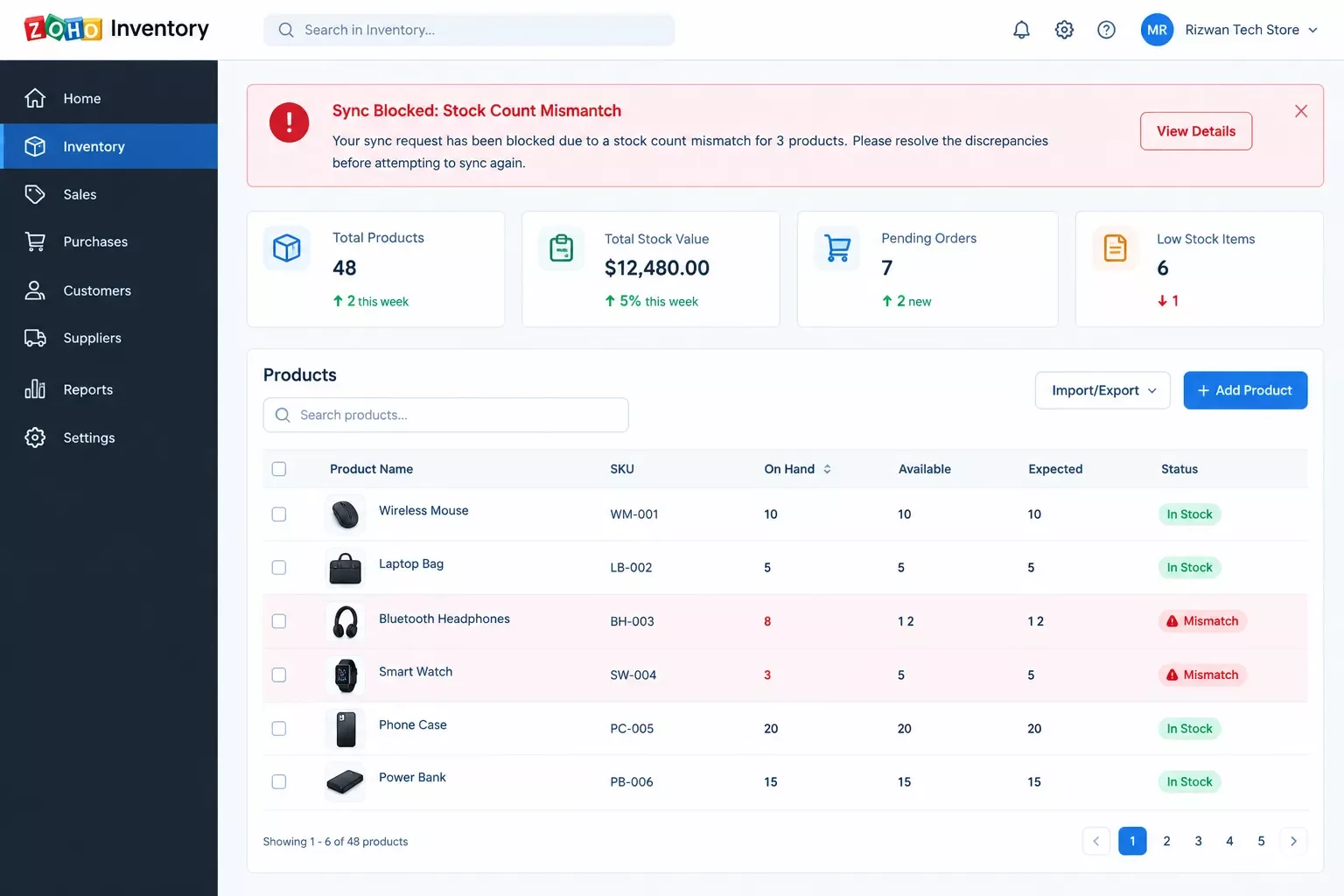
Illustration of a sync error banner and a stock-count mismatch on an inventory dashboard.
- Hitting your plan's daily API call limit. As of October 2026, Zoho's plan comparison page lists a daily API limit that rises with the plan, from 1,000 calls on Free to 10,000 on Plus and Enterprise. Any tool that connects through Zoho's API, including Make.com's Zoho Inventory app, works within the limit for your plan.
- Shopify inventory counts change on their own. Users on Zoho's own community forums have reported stock numbers shifting unexpectedly after switching to multi-location tracking with a Shopify connection active.
- Connections that need reauthorization. Make's own Zoho Inventory documentation notes that a connection may need reauthorization at some point, and a stalled sync is easy to miss unless you set up an alert (see the fix section below).
- Field mapping breaks between Zoho Books and Zoho Inventory. A renamed custom field or a new SKU format can throw off the match, causing invoices or orders to land in the wrong place.
- Plan limits on Shopify stores. As of October 2026, Zoho's plan comparison page lists one Shopify store on Free and Standard and five on Premium, Plus, and Enterprise. Order, user, and location limits also vary by plan.
Here's the part most reviews skip: Make.com can sit between Zoho Inventory and your other apps on a schedule you control, so you can add your own error handling and alerts instead of finding out about a mismatch days later.
Why Zoho Inventory's Integrations Keep Breaking in the First Place
Zoho Inventory's Shopify integration runs on the Sync Frequency you pick and records each run on a sync history page. It handles that one connection per store, and it is not a coordinator for every other app that touches the same stock counts. That gap sits behind many of the issues above.
When a run fails, Zoho's sync history page records which items and orders failed, and you re-initiate them from there. So when your store has a busy afternoon and several systems update the same stock count within minutes of each other, it's up to you to decide which system owns the number.
Authorized connections can also lapse. Make's own documentation notes that a connection may need reauthorization at some point, and a stalled sync is easy to miss until a customer asks why an order shows the wrong quantity. This is a similar breakdown pattern to what happens with business process automation tools that weren't designed for real-time multi-app coordination either.
That's the real difference. A central automation layer sits between your apps, and you decide what happens when a run fails: re-run it after a delay, save it for review, or send you an alert. It's not that Zoho Inventory is a bad tool. Its Shopify integration is one connection per store, not the whole safety net for a business running several connected apps at once.
Fixing Glitchy Zoho Inventory Third-Party Integrations
The fix is to give one system ownership of stock updates and add error handling around it. Make.com has a Verified Zoho Inventory app that can watch for new or changed items, item adjustments, and sales orders, then create or update records in your other tools.
According to Make's documentation, the app offers Watch triggers for items, item adjustments, and sales orders, actions to create and update items and sales orders, and a Make an API Call module for anything the app does not cover. You connect it with Zoho's OAuth sign-in and your Zoho Organization ID.
One honest limit: the app has no instant trigger. Its Watch triggers run when your scenario runs, so syncing is near-real-time on a schedule, not instant. Scenarios run every 15 minutes by default, and the shortest interval depends on your Make plan (Make Academy lists 15 minutes on the free plan and as low as 1 minute on paid plans). Each scheduled check also uses credits for the trigger.
Error handling takes a little setup. Make does not have a Retry directive, but its Break error handler can save a failed run as an incomplete execution (turn on incomplete executions in the scenario settings first). With automatic completion enabled, it re-runs that execution after the delay and number of attempts you choose, though not every error type can be retried automatically. You can also add an email or Slack module to the error route so you hear about a failure. See Make's error handling directives.
⚠ Watch Out For: If Zoho's native Shopify integration and a Make.com scenario both write stock levels, they can overwrite each other's numbers. Pick one system to own stock updates, and check the Sync Stock and Fetch Stock Counts settings in Zoho's Shopify integration before you add a second one.
It's a similar story if your integration issues are spilling into your bookkeeping. If broken Zoho Inventory syncs are throwing off your invoices too, it's worth fixing your invoicing automation at the same time so both systems stay reliable together.
How to Fix Each One
Each fix below pairs directly to the mistake causing it, so you can jump straight to the problem you're actually having.
- Fix API call limit problems: check your plan's daily API limit on Zoho's plan comparison page, then lengthen your Make scenario's interval or filter what it watches so it makes fewer calls.
- Fix unexplained Shopify stock changes: set your automation to be the single source of truth for stock updates, so Zoho Inventory and Shopify aren't both trying to independently push changes to the same count. If you're also running an ecommerce automation software stack, this same principle keeps every channel in sync.
- Fix stalled connections: add an email or Slack module to your scenario's error route so a failed run notifies you, and reauthorize the connection if Make asks for it.
- Fix field mapping mismatches: map your custom fields once inside Make.com's scenario editor, where you can see exactly how each field lines up instead of guessing.
- Fix plan limits: compare your Shopify store count and order volume with the limits on Zoho's plan comparison page before choosing a plan. A Make.com scenario still works inside your Zoho plan's limits, so it does not remove them.
2026 Advanced Tips & Scalability
Once your basic sync is stable, Make's error handlers let you decide how each type of failure is handled instead of treating every error the same way. The Break handler can re-run a failed execution after a delay, which suits a temporary outage, while a genuine data conflict is better saved as an incomplete execution that you review by hand. That control matters more as you add sales channels. Because each scheduled check uses credits, set the interval to match how fast you really need stock to update, rather than the shortest one your plan allows. Make keeps incomplete executions in a list you can review, so a failed run does not simply vanish. Test the scenario with a few real orders before you activate the schedule. If you want to layer in even more capability, some AI tools that pair with your Make.com stack can help flag unusual inventory patterns before they become a real problem.
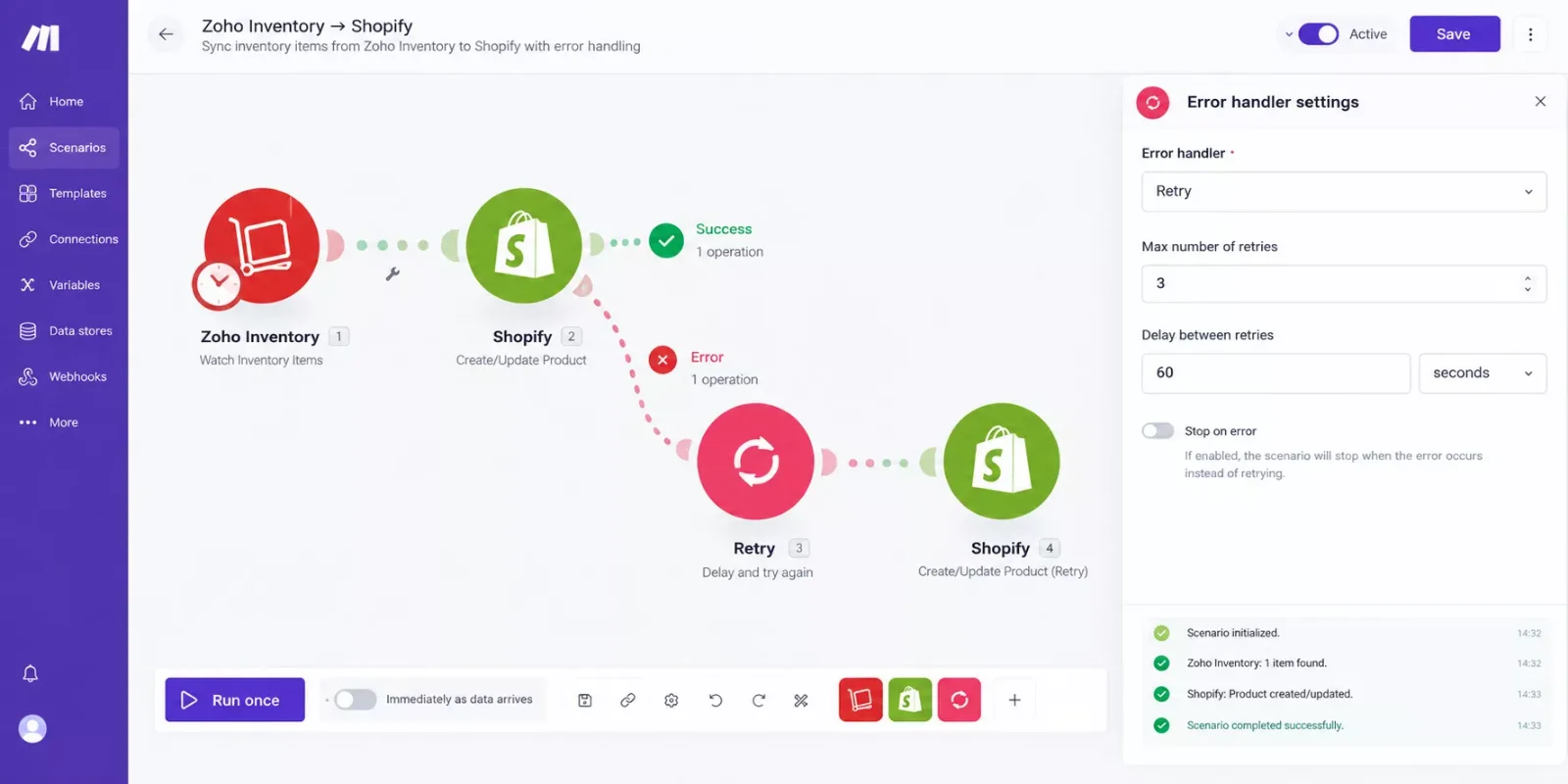
A Make.com scenario connecting Zoho Inventory to Shopify, with an error-handling route on the Zoho Inventory module.
People Also Ask
Why do Zoho Inventory's third-party integrations keep breaking or acting glitchy?
Users report stock counts changing on their own and Shopify orders not appearing as sales orders. Zoho runs the sync on the frequency you set and logs each run on a sync history page, so check there first for failed items or orders.
Can I connect Zoho Inventory to non-Zoho tools more reliably than its native integrations?
Yes. Make.com's Verified Zoho Inventory app can connect Zoho Inventory to non-Zoho tools like Shopify on a schedule you control, with field mapping you set yourself and error handling you add. It is near-real-time on a schedule, not instant, and it works within your Zoho plan's limits.
Is Zoho Inventory worth it if I'm not already using other Zoho apps?
It can still be worth it. Zoho Inventory works as a standalone tool with solid multi-channel tracking, and connecting it to non-Zoho apps through Make.com means you're not locked into the wider Zoho ecosystem to make it useful.
Does fixing my Zoho Inventory integrations require coding?
No. Make.com's scenario builder is visual, so you connect and configure apps by dragging modules and mapping fields, no code required.
Will this work with my current Zoho Inventory plan?
Make connects through Zoho Inventory's API, which Zoho's plan comparison page lists on every plan, including Free, with daily call limits that rise by plan. Your plan's limits on orders, users, locations, and Shopify stores still apply.
How long does it take to set up a more reliable sync?
It depends on how many fields, stores, and error cases you set up. The builder is visual, but plan time to test with a few real orders before you trust it with live stock.
What happens if a sync still fails after I set this up?
That depends on what you configured. With a Break error handler and automatic completion turned on, Make re-runs the failed execution after your chosen delay, and an email or Slack module in the error route can alert you. Not every error type can be retried automatically.
Why is my Zoho Inventory stock not syncing with Shopify?
Start with Zoho's sync history page, which logs which items and sales orders synced or failed and lets you re-run them. Then check your Sync Stock, Fetch Stock Counts, and Sync Frequency settings. Some users also report stock changes after switching to Locations.
Does Zoho Inventory's free plan include the Shopify integration?
As of October 2026, Zoho's plan comparison page lists a Shopify store integration on the Free plan (one store), alongside limits of 50 orders a month, 1 user, and 1 location. Higher plans raise those limits, so check Zoho's pricing page before you rely on it.
Can Make.com sync Zoho Inventory and Shopify in real time?
Not instantly. Make's Zoho Inventory app has Watch triggers but no instant trigger, so scenarios run on a schedule, near-real-time at best. The shortest interval depends on your Make plan: 15 minutes on the free plan, and as low as 1 minute on paid plans.
Zoho Inventory itself isn't the problem. It's a solid tool for small businesses managing multi-channel stock. The breakdowns happen when a growing, multi-app setup relies on one native sync with no safety net of its own, and that's a fixable gap, not a sign you're doing something wrong.
⚡ Pro Tip: Start by automating just your highest-volume connection first (usually Zoho Inventory to Shopify), then expand to Zoho Books and any other tools once that one's stable.
⚠ Watch Out For: Don't disable a broken native integration and walk away without a replacement. That leaves your stock counts unsynced in the background, which is often worse than a visible error.
If untangling your Zoho Inventory integrations yourself isn't the best use of your week, this is exactly the kind of build I hand off, fully working, for small teams like yours. As one of the more thorough breakdowns of Make.com automation workflows you'll find, this is what SmartSoloFlow does best: taking a glitchy multi-app setup and making it dependable.
Tired of Manually Fixing Sync Errors?
Want this exact automation set up for your business, or need something custom for your specific app stack? Reach out and let's get it working reliably.
Let's TalkFound this guide useful? Share it with a fellow freelancer who's still doing things manually. 🚀
Got a question or a workflow roadblock? Drop it in the comments below, happy to help.
Last Updated: October 8, 2026

// Comments